This is an old revision of the document!
== Project setup
- Create tracker project (you can also clone a matching project to have prefilled properties)
- Import schedule.xml
- Set all master tickets from staging to staged via mass-edit
- Adjust project properties, recommendations: (full reference at the bottom of the page)
- Compare project properties with previous instalment of the same event
optimal properties from current project
Meta.Acronym camp2023
Meta.Album Chaos Communication Camp 2023
Meta.License Licensed to the public under http://creativecommons.org/licenses/by/4.0
Meta.Year 2023
Processing.Auphonic.Enable no
Processing.BasePath /video/
Processing.MasterMe.Enable yes
Processing.Path.Intros /video/intros/camp2023
Processing.Path.Outro /video/intros/camp2023/outro.ts
Publishing.Upload.SkipSlaves speedy,tweety,blade1,blade2,blade3,blade4
Publishing.UploadTarget releasing.c3voc.de:/video/encoded/camp2023/
Publishing.Tags <additional tags>
Publishing.Voctoweb.Enable yes
Publishing.Voctoweb.Path /cdn.media.ccc.de/events/camp2023
Publishing.Voctoweb.Slug camp2023
Publishing.Voctoweb.Thumbpath /static.media.ccc.de/conferences/camp2023
Publishing.YouTube.Category 27
Publishing.YouTube.Enable yes
Publishing.YouTube.Playlists <meep>
Publishing.YouTube.Privacy <one of: public, unlisted, private>
Publishing.YouTube.Token <meep>
Record.Container TS
Record.EndPadding 300
Record.Slides yes
Record.StartPadding 300
=== Worker Filter Examples
EncodingProfile.IsMaster=no EncodingProfile.IsMaster=yes EncodingProfile.IsMaster= Fahrplan.Room=Servus.at Lab
Please note that the conditions in the “project to worker group” filter are currently always evaluated with logical OR.
Specifying a property with an empty value, which is often done for EncodingProfile.IsMaster, will match if this property does not exist at all on a ticket. So for EncodingProfile.IsMaster, specifying an empty filter will match on recording tickets which never have this property. == Pipeline setup during event
During event setup of the pipeline, you have to decide if you want leave the MPEG TS snippets only on the recording cubes or also rsync them to a central storage:
=== Simple: single-room setup (Variant 2)
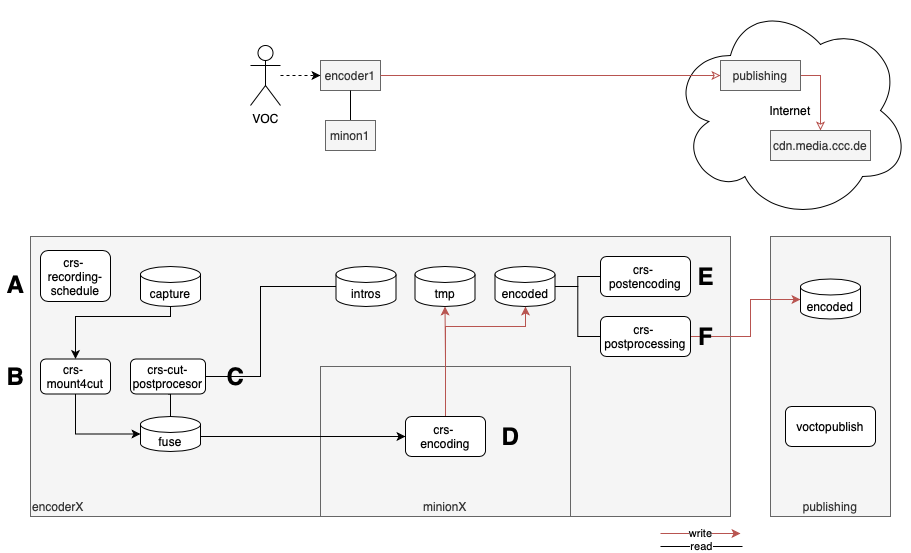
This variant is only practical if you have only one room, or at least one release encoder (aka Minions) for each recording cube. When using this variant with multiple rooms in one Tracker project (like at JEV22), you also have to set room filters in the tracker worker queues.
For every worker:
- set
EncodingProfile.IsMaster = yesto avoid encoding all sub formats - (set room filters in tracker e.g.
Fahrplan.Room = Foobar, but this cannot be used at the same times as the above, see the warning below)
For every recoding cube:
- start tracker worker:
sudo systemctl start crs-worker.target
For each minion:
- mount filesystems from encoder cube:
sudo crs-mount <storage location> - start tracker scripts for encoding:
sudo systemctl start crs-encoding.service
Attention
Since tracker filters are joined via OR and not AND, this setup cannot be extended to multiple rooms without hacks if you want to e.g. limit on-site encoding to master formats.
=== centralised storage (rsync) (Variant 1)
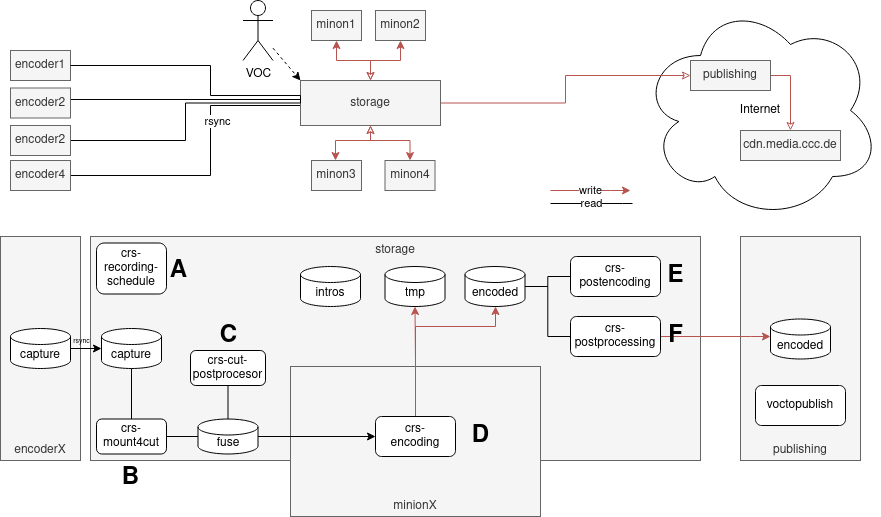
The first variant is typically used for events with more than one room. For bigger events we use the dedicated storage server in the event server rack, for smaller events a USB connected hard drive to one of the minions might be sufficient. Each recording cube exposes the files via rsyncd, which are pulled by an rsync process running inside a screen on the storage pc.
For each encoderX start rsync on the central storage: sudo systemctl start rsync-from-encoder@encoderX.lan.c3voc.de
Then, start tracker workers on storage: sudo systemctl start crs-worker.target (only needed if you don't use storage.lan.c3voc.de - worker scripts get started automatically)
==== Minion setup
To allow the encoding workers to do their job, they need to mount the storage first: sudo crs-mount <storage location>
After mounting, you can start the tracker encoding workers: sudo systemctl start crs-encoding.service
The minion VMs running inside our event colo case automatically mount storage.lan.c3voc.de via cifs and start their worker scripts. You usually do not need to touch them.
==== Cube as worker setup
At small events, when the talks are finished for today, you can use the recording cubes to encode master MP4 files.
First: Stop voctocore.
The rest is very similar to above, but with different mounts so /video/capture is not hidden:
sudo mount -t cifs -o uid=voc,password= //storage.lan.c3voc.de/fuse /video/fuse sudo mount -t cifs -o uid=voc,password= //storage.lan.c3voc.de/video/intros /video/intros sudo mount -t cifs -o uid=voc,password= //storage.lan.c3voc.de/tmp /video/tmp sudo mount -t cifs -o uid=voc,password= //storage.lan.c3voc.de/encoded /video/encoded
=== decentralised pipeline aka “even more samba” (Variant 3)
Attention
The “decentralized pipeline (Variant 3)” should not be used by inexperienced users. Use the information above to find out how to get this variant working, then adjust/improve the documentation here.
Similar to variant 2, but extended to work with multiple rooms. Instead of using rsync, recorded snippets remain on the encoding cubes and /video/fuse/$event/$room are exposed via samba to the minions, while the encoded and tmp files live on one “central” minion; all other minions mount /video/encoded and /video/tmp from the primary minion [reasoning: the tracker cannot guarantee that the machine which encoded a talk also does the postprocessing (upload) step, so all minions have to see the same files].
Tracker filters have to be set only for the recording cubes, minions do not require any filters (but on smaller events without many minions, a EncodingProfile.IsMaster=yes filter can be a good idea, so sub formats won't crowd out the queues — they can always be encoded off-site later).
On recording cubes: start the followin systemd units:
crs-recording-schedulercrs-mount4cutcrs-cut-postprocessor
On all minions, including the one acting as storage, do
mkdir -p /video/fuse/$event/{$room1, $room2, ..} mount.cifs -o uid=voc,password= {$encoder1.lan.c3voc.de,}/video/fuse/$event/$room1 mount.cifs -o uid=voc,password= {$encoder2.lan.c3voc.de,}/video/fuse/$event/$room2 …
On all minions except the one acting as storage, also mount:
mount.cifs -o uid=voc,password= $storage.lan.c3voc.de/encoded /video/encoded mount.cifs -o uid=voc,password= //$storage.lan.c3voc.de/tmp /video/tmp mount.cifs -o uid=voc,password= {$storage.lan.c3voc.de,}/video/intros
Finally on all minions, including the one acting as storage, start the following systemd units:
crs-encodingcrs-postencodingcrs-postprocessing
==== Old example with systemd units and case 1 and 5, which was used during jev22 in Munich:
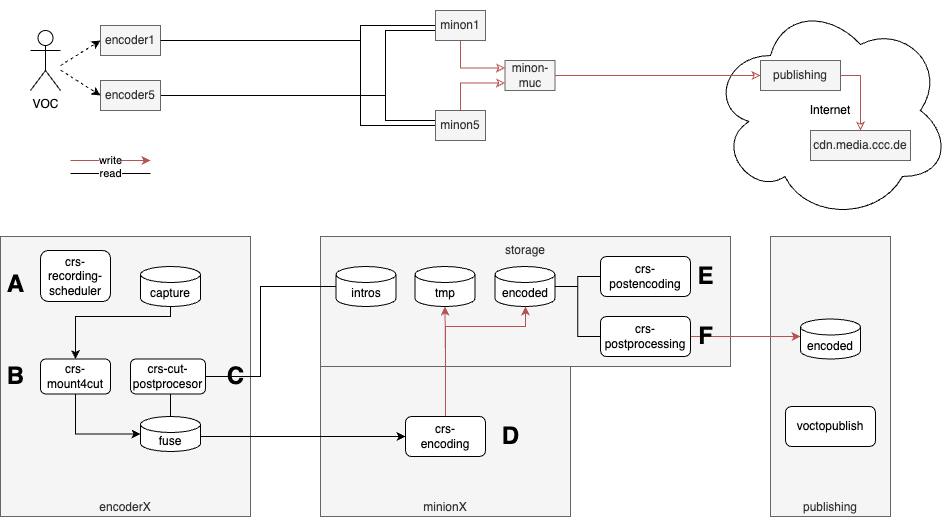
optional: configure 10.73.0.2 (aka storage.lan.c3voc.de) on the master minion as secondary ip
on recording cubes, mount or copy the intros from their source – here storage.lan.c3voc.de
sudo mount -t cifs -o password= {//storage.lan.c3voc.de,}/video/intros
sudo systemctl start crs-recording-scheduler # A
sudo systemctl start crs-mount4cut # B
sudo systemctl start crs-cut-postprocessor # C
# check if everything is running as expected – you might have to disable/stop the other CRS workers D-F
sudo systemctl status -n 0 crs-*
on master minion (in this example storage.lan.c3voc.de)
mkdir -p /video/fuse/jev22/{Ahlam,Bhavani}
mount -t cifs -o password= {encoder1.lan.c3voc.de,}/video/fuse/jev22/Ahlam
mount -t cifs -o password= {encoder5.lan.c3voc.de,}/video/fuse/jev22/Bhavani
sudo systemctl start crs-encoding # D-encoding
sudo systemctl start crs-postencoding # E-postencoding-auphonic
sudo systemctl start crs-postprocessing # F-postprocessing-upload
# check if everything is running as expected – you might have to disable/stop the other CRS workers A-C
sudo systemctl status -n 0 crs-*
(ensure that samba is installed on this master minion aka storage)
on other minions
mkdir -p /video/fuse/jev22/{Ahlam,Bhavani} mount -t cifs -o uid=voc,password= {encoder1.lan.c3voc.de,}/video/fuse/jev22/Ahlam mount -t cifs -o uid=voc,password= {encoder5.lan.c3voc.de,}/video/fuse/jev22/Bhavani mount -t cifs storage.lan.c3voc.de/encoded /video/encoded mount -t cifs -o password= //storage.lan.c3voc.de/encoded /video/encoded mount -t cifs -o password= //storage.lan.c3voc.de/tmp /video/tmp mount -t cifs -o password= {storage.lan.c3voc.de,}/video/intros
==== Old example with custom screenrc and case 5 and 6:
on recording cube, without intros either copy or mount the intros from their source
sudo mount -t cifs -o password= {//storage.lan.c3voc.de,}/video/intros cd /opt/crs/tools/tracker3.0/ sudo ./start screenrc-pipeline # with steps A, B and C
on master minion (in this example minion5)
mount -t cifs -o password= //encoder5.lan.c3voc.de/video/fuse/podstock2019/Aussenbuehne /video/fuse/podstock2019/Aussenbuehne mount -t cifs -o password= //encoder6.lan.c3voc.de/video/fuse/podstock2019/Innenbuehne /video/fuse/podstock2019/Innenbuehne mount -t cifs -o password= //encoder6.lan.c3voc.de/video/intros /video/intros cd /opt/crs/tools/tracker3.0/ sudo ./start screenrc-pipeline # with steps D, E, F
(ensure that samba is installed on this master minion)
on other minions
mount -t cifs -o password= {encoder5.lan.c3voc.de,}/video/fuse/podstock2019/Aussenbuehne mount -t cifs -o password= {encoder6.lan.c3voc.de,}/video/fuse/podstock2019/Innenbuehne mount -t cifs storage.lan.c3voc.de/encoded /video/encoded mount -t cifs -o password= //storage.lan.c3voc.de/encoded /video/encoded mount -t cifs -o password= //storage.lan.c3voc.de/tmp /video/tmp mount -t cifs -o password= {storage.lan.c3voc.de,}/video/intros cd /opt/crs/tools/tracker3.0/ sudo ./start screenrc-encoding-only # only step E